 Smart Scan
See where your disk space went
One scan checks Xcode, JavaScript, Rust, Go, Python, Java, Android, Flutter and more, then sorts what it found by size so the biggest wins come first.
Only what's safe to remove
Build folders count only when they sit next to their project file, and settings, keys and history are left alone.
Review before you clean
Every item shows its size and when it was last used. Recent work stays unselected.


 Space Map
Find the folders eating your disk
Space Map draws your Home folder as blocks sized by how much they hold, so the biggest folders jump out. Click any block to dig deeper.
Drill down with a click
Open a folder to map what's inside, and jump back with the breadcrumb.
Spot forgotten folders
Colors go from green for recent changes to red for folders untouched for two years or more.


 Uninstaller
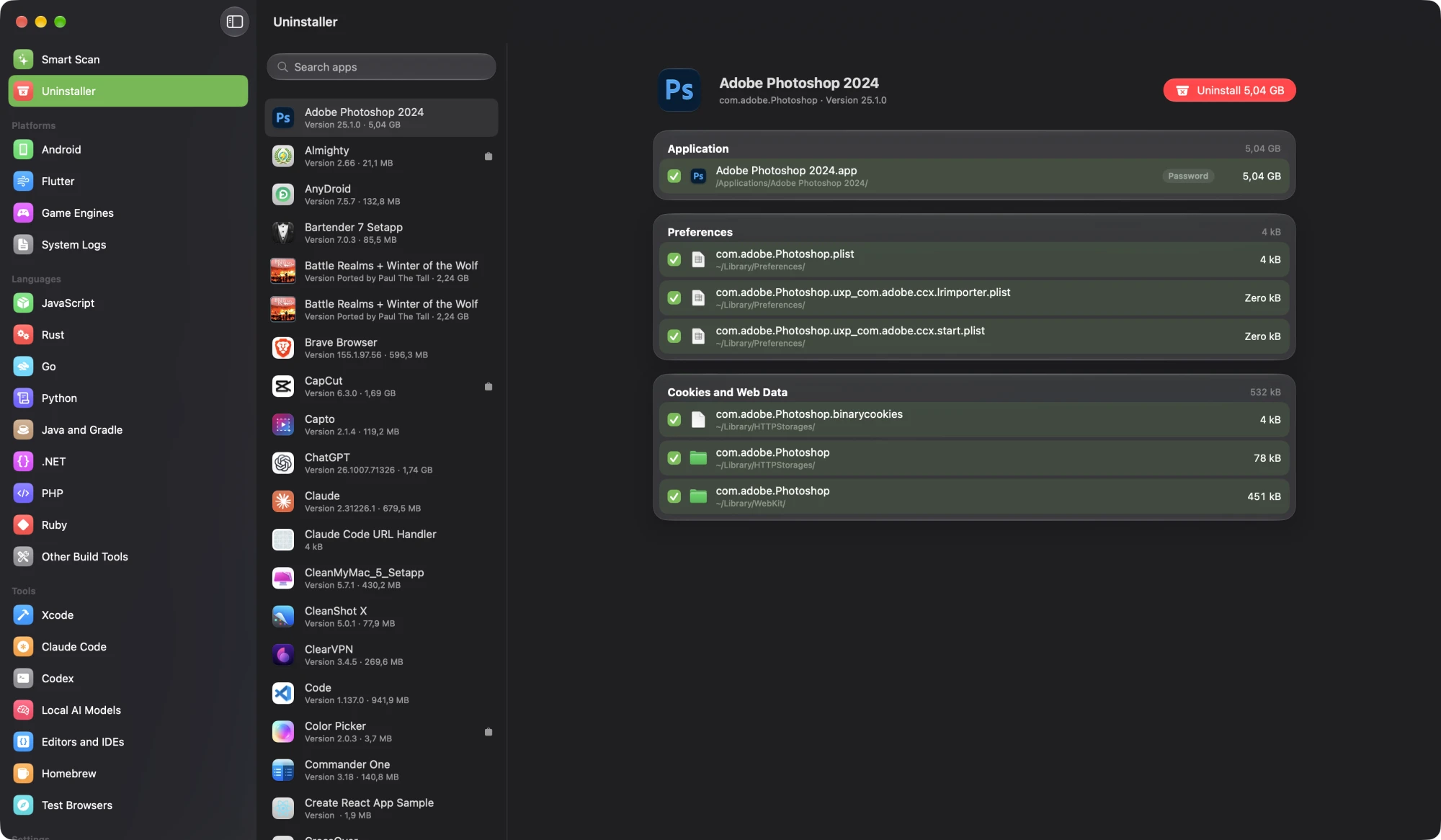
Remove apps and everything they left
Pick an app and Cleana finds its caches, preferences, containers, saved state and launch agents by bundle id, then moves it all to the Trash.
Exact matches
Files are matched by bundle id and app group, so other apps' data stays where it is.
Moved to the Trash
Changed your mind? Put things back from the Trash like any other file.


Xcode
Derived data, old device support, unavailable and unused simulators, previews and package caches
JavaScript
node_modules in projects you haven't touched, framework build output, npm, Yarn and Bun caches

More Languages
Cargo target folders, Go module cache, Python caches, Gradle, Maven, Flutter, .NET, PHP and Ruby

AI Tools
Old Claude Code and Codex sessions, debug logs and local model downloads you choose

Editors and Tools
VS Code, Cursor and JetBrains caches, Homebrew downloads and test browsers

Your Project Folders
Point Cleana at the folders where you keep code and it searches them for build output

Keyboard First
Scan with ⌘R, clean with ⌘⌫, and bring Cleana up from anywhere with your own shortcut

Feels at Home
Liquid Glass design, launch at login and automatic updates

Unlimited with Pro
5 scans a day out of the box, unlimited with a pay-what-you-want license
Simple pricing
Choose the version that fits how you work.
Cleana
Everything Cleana does, up to 5 scans a day
- 5 scans a day
- Every scan target, from Xcode to AI tools
- Review every item before cleaning
- App uninstaller with leftovers
- Requires macOS 26 or later
Cleana Pro
Pay what you want on Gumroad
- Unlimited scans
- Supports new scan targets and future updates
- Automatic updates via Sparkle
- License key delivered with your Gumroad receipt
- Requires macOS 26 or later