Blog
Coolbar, the innovative Mac app developed by Indie Goodies, is revolutionizing the way users interact with their files, folders, links, and more. This powerful tool allows users to effortlessly drag and drop various elements into their Mac's menu bar, providing quick and convenient access to important information and resources.
With its robust support for website links, multi-account logins, and customizable features, Coolbar is a game-changer for Mac users seeking to enhance productivity and streamline their workflow.
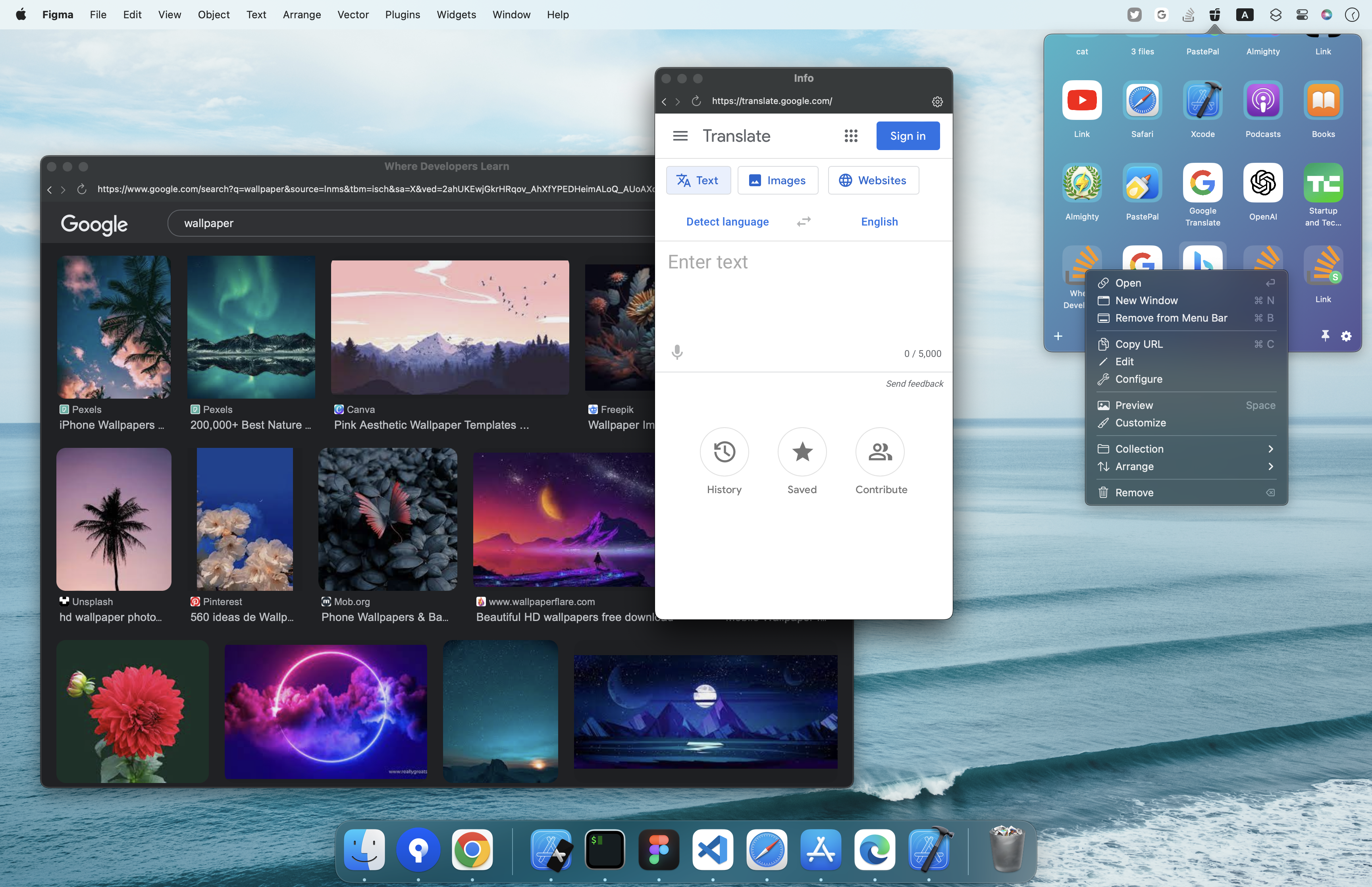
Pin website links to status menu bar
Coolbar simplifies the process of organizing and accessing files, folders, links, text, and images. By utilizing the drag-and-drop functionality, users can easily save these elements directly into the menu bar, ensuring they are always at their fingertips. This feature eliminates the need for navigating through multiple windows or searching for files, allowing for a more streamlined and efficient workflow.
One of the standout features of Coolbar is its seamless integration with website links. Users can pin frequently visited websites to the status menu bar, enabling quick access with a single click.
Furthermore, Coolbar allows customization options such as configuring the size, user agent, and even blocking ads, providing a personalized browsing experience right from the menu bar. With support for multiple login sessions, users can conveniently manage multiple accounts on platforms like Twitter, making it ideal for professionals and social media enthusiasts alike.
Floating website windows
Coolbar takes website link management a step further by enabling users to open websites as separate floating windows. This feature allows for easy access and visibility, providing a clutter-free workspace and reducing the need to switch between different browser tabs or windows. By keeping important websites within reach, users can stay focused and quickly access the information they need without interruption.
Coolbar understands the importance of customization, and users can personalize their experience to suit their preferences. From the appearance and arrangement of items in the menu bar to the specific websites and login sessions, Coolbar offers a high degree of flexibility and adaptability. Users can tailor Coolbar to their unique workflow, ensuring an efficient and personalized experience.
Coolbar from Indie Goodies is a must-have Mac app for users seeking to enhance productivity and streamline their workflow. With its drag-and-drop functionality, support for various file types, and seamless integration with website links, Coolbar provides quick and convenient access to essential information right from the menu bar.
The ability to configure website settings, manage multiple logins, and open websites in floating windows further amplifies its versatility. Experience the power of Coolbar and take control of your Mac's menu bar to boost productivity and effortlessly access the resources you need
Visit Coolbar for a great menu bar experience.